Skip to Content
Skip to content
Ceramic Bazar · Tiles, pipe & sanitary ERP

Sell tiles in boxes. Bill in square feet.

Sales, stock, delivery and dues for tiles, pipe and sanitary ware businesses: every document speaks boxes, loose pieces and square feet, with discount approvals, previous dues and a live sales dashboard.
12 modules · 78 features · See everything it covers

Ceramic Bazar · Sales dashboard
Ceramic Bazar screenshot
  • Boxes & pieces
  • Discount approvals
  • Previous dues
Why Ceramic Bazar

Built for the way you work.

Boxes, pieces and square feet

Enter tiles in boxes and loose pieces, pipes in pieces. The quantity in sq ft or ft fills in on every quotation, delivery and invoice.

Sales with guard rails

Discount limits per salesperson with approval, salesperson signatures and stock checks per warehouse before an order is confirmed.

Dues that carry forward

Unpaid earlier invoices are added to the new invoice as “Previous Dues” through a proper journal entry, and undo cleanly.

Know what sells

A live sales dashboard and six PDF and Excel reports: profit, invoices, categories, demand, customers and sales by hour.
Real screens

Inside Ceramic Bazar.

Ceramic Bazar · Sales dashboard
Ceramic Bazar: Sales dashboard

Sales dashboard

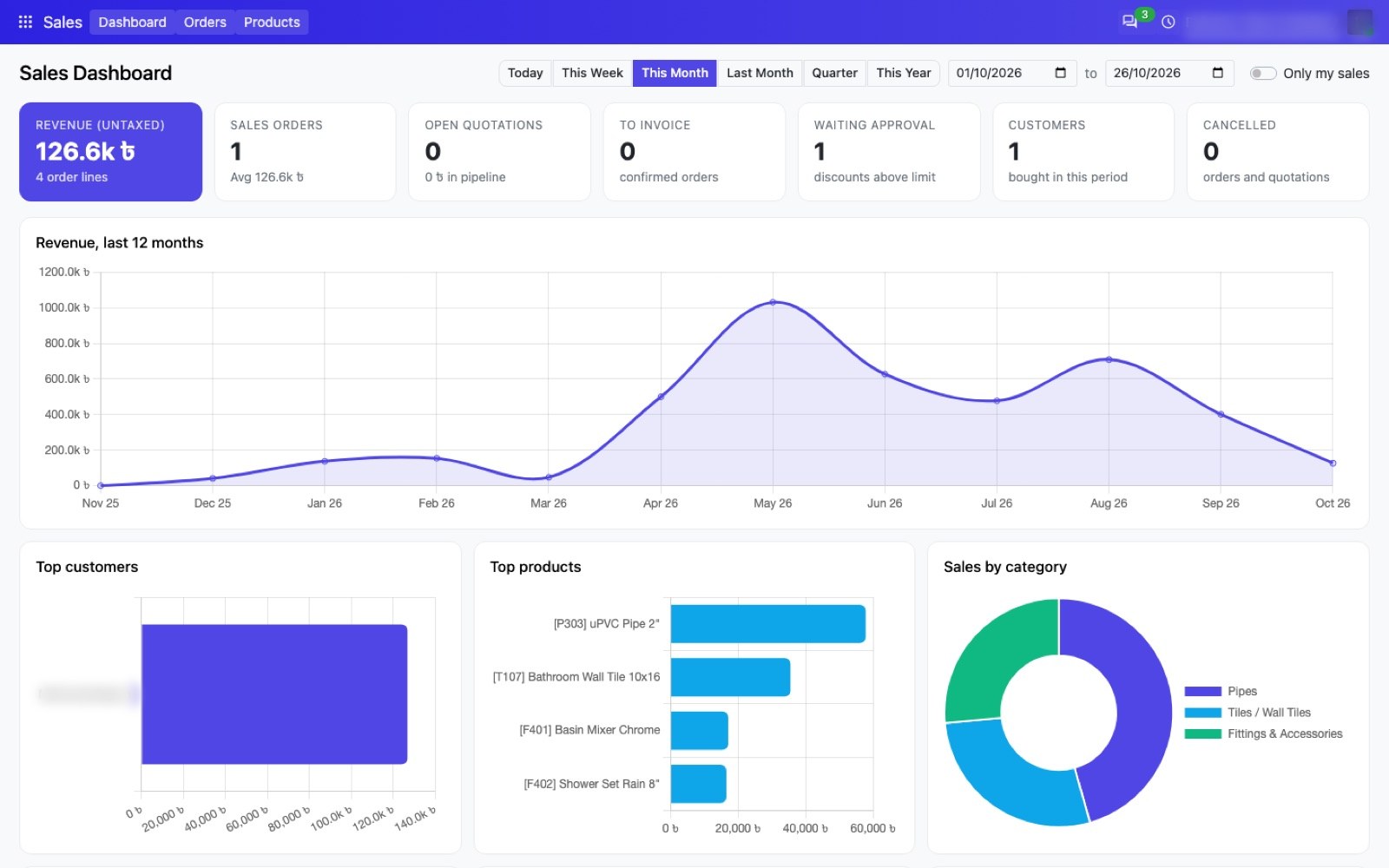
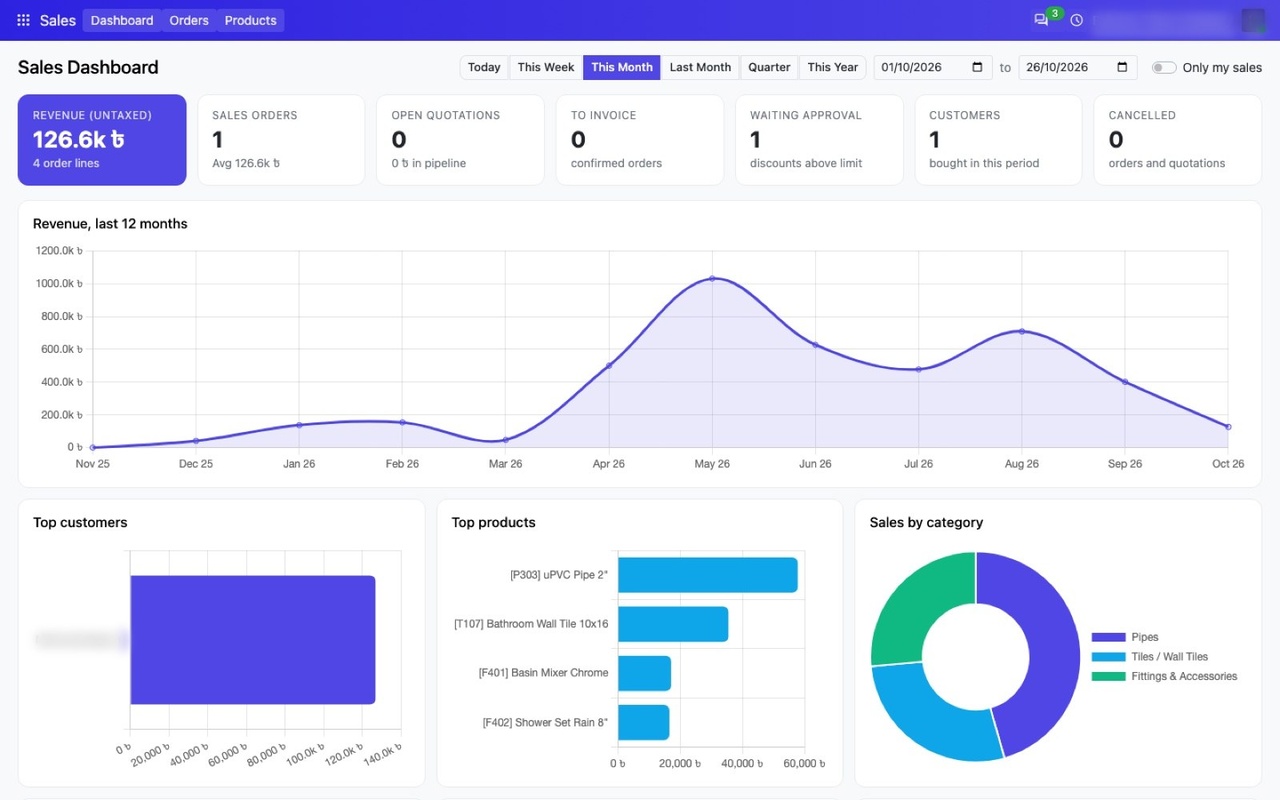
Revenue, orders, open quotations, approvals and customers for any period, with charts for the last 12 months, top customers, top products and sales by category. Click a figure to open the records behind it.
  • Today, week, month, quarter, year or your own dates
  • "Only my sales" switch for every salesperson
  • Slowest sellers and largest orders at a glance
  • Loads in one fast request and respects each user’s access
Ceramic Bazar · Home screen
Ceramic Bazar: Home screen

Home screen

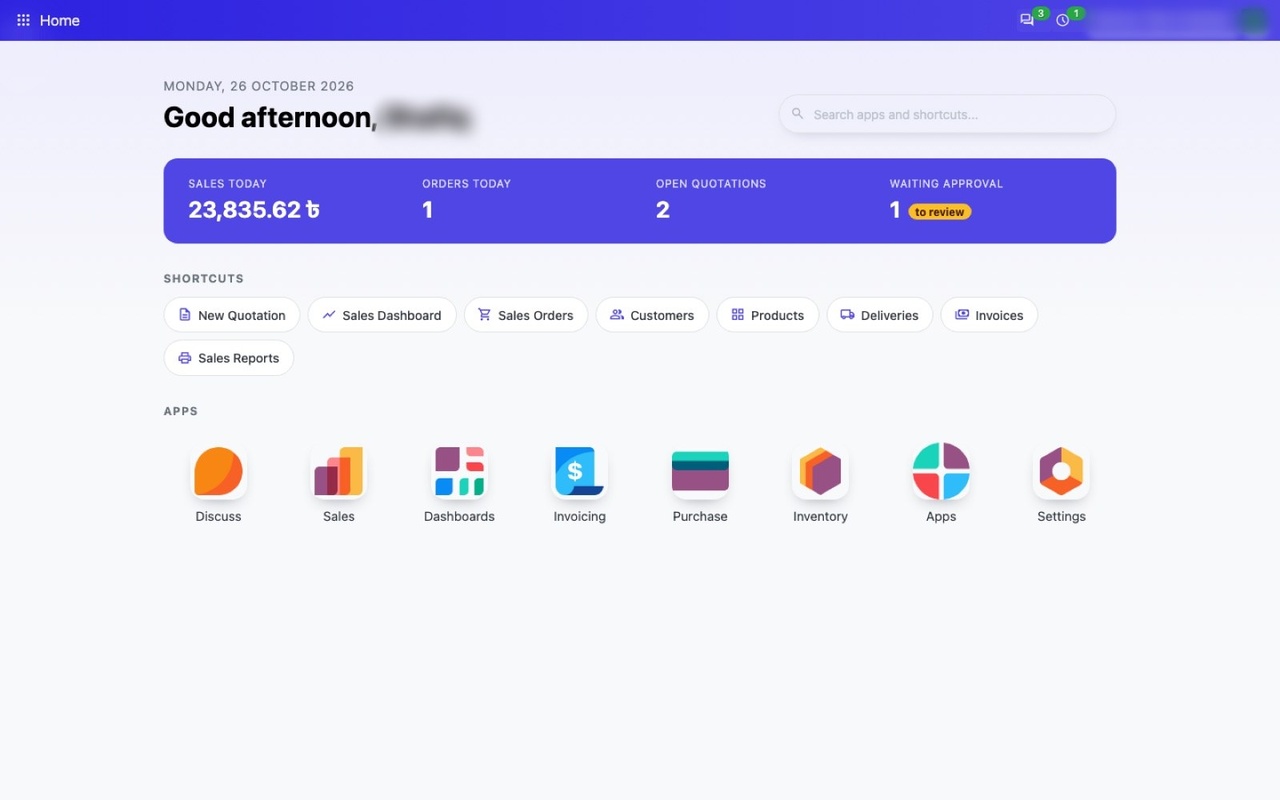
Every user starts the day on a home screen with today’s numbers and one-click shortcuts to the work they do most.

  • Today’s sales, orders, open quotations and approvals
  • Shortcuts to quotations, orders, deliveries, invoices and reports
  • Search apps and shortcuts from one box
Modules

Everything Ceramic Bazar covers, module by module.

Catalog and Customers

Tile, Pipe & Sanitary Catalog

Products that know their size, box and length.

9 features

  • Industry type per product category: Tiles, Pipe, Sanitary Ware or Other
  • Tile size in inches (12x24, 12 X 24, 12/24 or 12*24 all work)
  • Area per piece (sq ft) calculated from the size
  • Pieces per box, with checks on size and box quantity
  • Feet per piece for pipe products
  • Brands and colors as their own lists, with no duplicates
  • Stock in boxes and pieces, converted from on-hand sq ft or ft
  • Search and group products by brand and industry type
  • Square foot, foot and inch units turned on automatically
Catalog and Customers

Customers

A permanent ID for every customer.

4 features

  • Customer ID from the year plus 7 digits (e.g. 20260000042)
  • Unique and read-only, printed on invoices and challans
  • Existing contacts get an ID on installation
  • Find a customer by phone number or Customer ID in every search box and dropdown
Selling

Boxes & Pieces on Every Document

One quantity language from quotation to invoice.

6 features

  • Boxes, loose pieces and total pieces columns, plus an optional tile size column
  • Tiles: enter boxes and loose pieces, or total pieces, and sq ft fills in
  • Loose pieces always stay below one box
  • Pipes: enter total pieces and the length in ft is calculated
  • Quotations, sales orders, purchase orders, deliveries, receipts and invoices
  • Values carry over: sale to delivery and invoice, purchase to receipt and bill
Selling

Quotations & Versions

Clean numbering and versions you can compare.

5 features

  • Separate quotation numbers (SQ/2026/00001)
  • The sales order number is given only on confirmation
  • New Version button: SQ/…-V1, -V2 and so on
  • Versions button lists every version of a quotation
  • Confirming one version cancels the others automatically
Selling

Approvals & Controls

Discounts, signatures and stock under control.

7 features

  • Maximum discount % per salesperson
  • Orders over the limit go to “Waiting for Approval”
  • Approvers get a to-do and approve or reject; who and when is recorded
  • Salesperson signature, optionally required before confirmation
  • Out-of-stock restriction on on-hand or forecast stock, per line warehouse
  • Lists exactly which products are short
  • Archive only cancelled or fully invoiced orders, with an “Archived” ribbon
Selling

Order-Line Tools

Everything the counter needs on each line.

7 features

  • Scan a barcode to add a product
  • Product image and a warehouse per line
  • On hand and forecast stock on the line
  • The customer’s last price, plus a sales history button
  • Optional product images on the quotation PDF
  • Print Invoice button on confirmed orders
  • Filters: Waiting for Approval, Hide Versions, Archived
Billing and Documents

Invoicing & Previous Dues

Carry old dues forward the right way.

8 features

  • Invoice on confirmation: nothing, a draft, or create and post
  • Open the invoice PDF straight after confirmation
  • Unpaid earlier invoices added as one “Previous Dues” line
  • Done with a transfer journal entry and reconciliation, with no fake payment
  • Account and journal created automatically
  • Reset to draft undoes everything
  • Previous Dues tab lists the invoices carried forward
  • Invoice terms per company, printed on the invoice
Billing and Documents

Sanitary Invoice & Delivery Challan

Printed documents your customers recognise.

6 features

  • A4 invoice with Client ID, phone and invoice time
  • Model, color, size, brand, pieces, SFT/FT, box, loose pieces, rate, gross and net
  • Summary: invoice amount, previous due, each payment and total due
  • Signature lines for customer, cash received by and seller
  • A4 landscape delivery challan with size, pieces per box, color and brand
  • Boxes, loose pieces, godown, salesperson and remarks on the challan
Reports and Insight

Sales Dashboard

The whole business on one screen.

8 features

  • Today, week, month, last month, quarter, year or a custom range
  • “Only my sales” switch
  • Revenue, orders, average order value, open quotations, to invoice, waiting approval, customers and cancelled
  • Click any figure to open the matching records
  • Revenue over the last 12 months
  • Top customers, products, categories and salespeople
  • Slowest-selling products and largest orders
  • Loads in one fast request and respects access rules
Reports and Insight

Sales Reports (PDF & Excel)

Six reports from one wizard.

8 features

  • Filter by period, company, customer, product, category, salesperson and status
  • Product Profit: cost, sales, profit and margin %, grouped your way
  • Invoice Analysis: invoiced, paid and due
  • Sales by Category: quantity, price, taxes and totals
  • Product Demand (Indent): boxes, pieces and quantity per customer
  • Customer Sales Analysis without double-counting carried dues
  • Sales by Hour: hour of day and day of week
  • Subtotals and grand totals in company currency
Reports and Insight

Home Screen & Look

A friendly start for every user.

5 features

  • Greeting, date and a search box for apps and shortcuts
  • Today’s sales, orders, open quotations and waiting approvals
  • Shortcuts: New Quotation, Dashboard, Orders, Customers, Products, Deliveries, Invoices, Reports
  • The apps button opens the home screen, and new users start there
  • A light MindSynth style for the backend
Reports and Insight

Security & Settings

Roles and switches for how you sell.

5 features

  • Discount Approver and Confirm Orders Without Stock groups
  • Sales managers get both automatically
  • Users only see their own report records
  • Settings for numbering, signature, stock check, auto-invoice and printing
  • Settings for quotation images, discount limits, previous dues and invoice terms

See Ceramic Bazar with your own data.

A 30-minute walkthrough, tailored to your team. No commitment — just a clear look at how it would work for you.

Request a demo

Ceramic Bazar

We reply within one working day. Your details are only used to answer you.